

Courses
Discover thousands of courses from top institutions and platforms worldwide
Level
Course Type
Duration

Udemy
Learn the entire Solidworks Sheet Metal module, with one of the most comphrensive courses available, covering all tools. What you'll learn: By the end of the course students will be able to confidently use the Solidworks Sheet Metal module to create a range of Sheet Metal models. All of the Sheet Metal features will be covered, as well as essential background information, like material types Level up your Solidworks skills by mastering the Sheet Metal module! Solidworks is one of the most popular and powerful 3DCAD programs in the world. Millions of people use it to design everything from 3D-printed toys allthe way up to fully-working mechanical vehicles. However, as well as being used for solid models, Solidworks also has a powerful Sheet Metal module that can be used to virtually make 3D parts from flat sheets. Now you can join the ranks of Solidworks Sheet Metal users, and learn to create your own Sheet Metal models! Why this course is different There are many Sheet Metal courses online, but none quite like this one:The course covers every Sheet Metal tool in depth and includes the theory behind Sheet Metal concepts like Bend Allowance. Taught by a Solidworks professional! The instructorbeen using Solidworks since 2006 and even taken a range of official Solidworks-certified training courses. The instructorcurrently works as a Product Design Engineer and uses Solidworks every day to design all sorts of things for real clients - no academic-only experience here!Built on previous feedback! This course is built upon the instructors other best-selling Solidworks courses, and on the feedback from over 7,000 previous students on Udemy alone.Understand the wider context of Sheet Metal use. As well as explaining the basic Sheet Metal techniques this course also details real world applications and uses, such as the best material to select for the projects, and manufacturing tips. About this course This courses includes:Over 4 hours of high-quality original video.Sections contain additional resources such as downloadable models and drawings, made specially for the course.Prompt support from expert instructor.Have a question? We are always here to support any questions and take a look at your progress. You will learnOver the course of eleven detailed sections you'll learn the entire range of Sheet Metal skills, including:Introduction to the Course - What it covers, how to use the course, and how best to get supportGetting Started with Sheet Metal - Base Flanges, Sheet Metal Properties and Material SelectionAdding Bends - Edge Flanges - one of the most Fundamental Sheet Metal featuresBasic Sheet Metal Features - Adding and Removing Material, Miter Flanges, Hems, Jogs and Sketched BendsAdvanced/Specialist Sheet Metal Tools - Crossbreak, Swept Flange, Gusset, Lofted Bend, Tab and Slot, Vent, Unfold and Fold processesCorner Details - Various Corner Tools available in Solidworks Sheet MetalCreating Sheet Metal Parts in Other Ways - Insert Bends, Convert to Sheet MetalForming Tools - Basic Use, modifying existing Forming Tools, and making and using entirely custom Forming ToolsPractical Example - Making an Enclosure - Many of the previous skills are now combined to create a multi-sheet Enclosure Model2D Drawings and Exporting Files - 2D Sheet Metal drawings and also how to export Sheet Metal parts into file types that can be widely used by third-party machines.Conclusion - This final section briefly recaps the entire course.The course is taught using Solidworks 2019 but the models and resources used will work with any version newer than that. If you have a previous version (2015-2018, or earlier) then users can still follow along and use the course but won't be able to open the optional, example models. There might also be slight differences in interface and terminology between versions. So sign up today, and begin your first steps in the exciting world of Sheet Metal modelling!

YouTube
Dive into an extensive 14-hour tutorial series on sheet metal design using Creo Parametric. Master a wide range of techniques, from basic concepts like flat and flange walls to advanced topics such as transitional unbends and seam lock joints. Learn to create various brackets, engine covers, electrical components, and household items while exploring features like twisted walls, gussets, punch forms, and blends. Gain proficiency in working with flat patterns, family tables, and BOM integration. Practice designing complex shapes like elbow joints, baskets, and perforated sheets. Develop skills in top-down modeling, solid-to-sheet metal conversion, and creating specialized components like wave washers and spiral torsion springs. By the end of this comprehensive series, acquire the expertise to tackle a wide array of sheet metal design challenges in Creo Parametric.

YouTube
Learn to create a stylish sheet metal bracelet in this 14-minute jewelry making tutorial. Master the essential techniques for working with copper sheet metal, including cutting, punching holes, and assembling components. Discover how to use specialized tools like metal shears, hole punches, bench blocks, and rawhide mallets to shape and prepare your materials. Follow step-by-step instructions to cut the metal sheet to size, create precise holes for connections, and attach jump rings and lobster clasps for a professional finish. Gain hands-on experience with fundamental metalworking skills while creating a wearable piece of jewelry using copper alligator skin pattern sheet metal and sterling silver findings.

Udemy
Complete and Automated Sheet Metal Design in Solid Edge What you'll learn: Create Sheet metal parts and flat patterns. Develop Sheet Metal models with fewer steps. Built sheet metal parts around an assembly. Sheet metal can be cut, bent and stretched into an amazing array of shapes. To meet unique sheet metal design challenges, like manufacturability, Solid Edge streamlines the entire sheet metal product development process, from CAD design through flat pattern and drawing development. Unlike general purpose CAD tools, Solid Edge includes sheet metal-specific features, like Emboss, Dimple, Drawn Cut, Bead, Contour Flange, Straight Brake and Etch. This class introduces the concepts and best practices for creating 3D sheet metal models with Siemens Solid Edge software. A core design capability of Solid Edge is the Sheet Metal environment, which provides an entire design-through-fabrication workflow, using streamlined synchronous modeling methods tailored to the unique needs of sheet metal design.

LinkedIn Learning
Learn to design parts and assemblies using the sheet metal tools in SOLIDWORKS.

YouTube
Explore a comprehensive 1.5-hour tutorial on Creo Sheet Metals, covering essential commands and features. Learn to use Planar, Flat, Flange, Bend, Edge and Planar Bend, Punch, Sketched and Flatten Form, Unbend, Bend Back, Flat Pattern, Edge, Surface, Sketched Rip, Rip Connect, Twist, Revolve Tools, Conversion, Corner Relief, and Bend Order commands. Practice creating an ice cube tray and inserting die forms in Creo Sheetmetal. Access additional Creo modules through provided links, including Sketch, Layout, Part Module, and Assembly.

YouTube
Learn to create elegant sheet metal rings in this 26-minute jewelry making tutorial from Jewel School. Master the essential techniques for working with patterned sheet metal to craft beautiful handmade rings using basic jewelry making tools. Discover how to properly cut sheet metal with shears, create precise holes using a hole punch, and shape your rings with a ring mandrel and rawhide hammer. Explore wire wrapping techniques with 20-gauge wire and learn to incorporate decorative elements like coin beads for added visual interest. Practice using fundamental tools including flush cutters, flat nose pliers, and dapping blocks to achieve professional-looking results. Follow along with step-by-step demonstrations that cover measuring, cutting, shaping, and finishing techniques essential for sheet metal jewelry construction. Gain hands-on experience with metalworking fundamentals while creating wearable art pieces that showcase your craftsmanship skills.

LinkedIn Learning
Prepare for the Certified SOLIDWORKS Professional Advanced Sheet Metal (CSWPA-SM) exam. Refresh your skills with flanges, hems, bend tables, and equations.

Pluralsight
The forming of sheets of metal into components is a key manufacturing process for many industries. SOLIDWORKS includes tools for the creation, development, management, and documentation of Sheet Metal components. In this course, SOLIDWORKS Essentials - Sheet Metal 101, you will learn how to use these tools. First, you will build sheet metal components from scratch and see how to convert existing models into fully functioning sheet metal components. Next, you'll use the Sheet Metal Parameters to manage the model sizing and bending criteria of the model. Further development of your models includes adding secondary features with like edge, curved, and miter flanges. Finally, you'll use the Sheet Metal Drawing environment to fully detail your sheet metal models for manufacturing. After finishing this course, you'll be ready to use a significant number of SOLIDWORKS tools and features for the design and documentation of sheet metal components.
YouTube
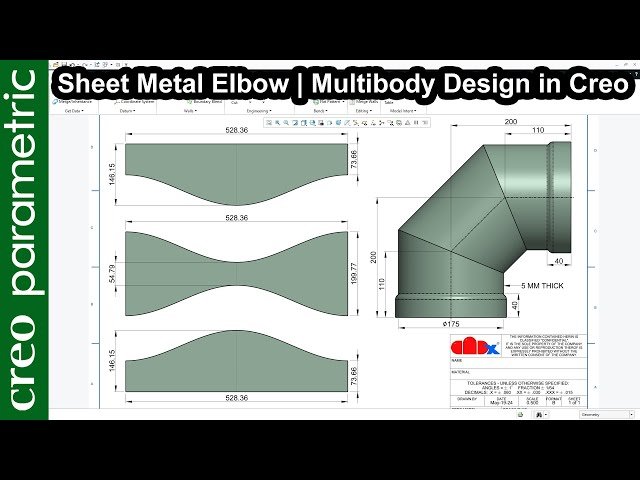
Learn to create complex sheet metal parts using multi-body functionality in Creo Parametric through this 20-minute tutorial that demonstrates designing a sheet metal elbow. Master the multi-body approach for sheet metal design, which allows for more sophisticated and efficient modeling of complex geometries. Explore advanced sheet metal techniques that go beyond single-body modeling, enabling you to handle intricate designs that require multiple interconnected components. Discover how to leverage Creo Parametric's multi-body capabilities to streamline your sheet metal workflow and create professional-grade elbow joints commonly used in HVAC, plumbing, and industrial applications. Gain practical experience with sheet metal design principles while working through a real-world example that showcases the power and flexibility of multi-body modeling in Creo Parametric's sheet metal environment.

YouTube
Explore a comprehensive sheet metal design workflow in this 39-minute livestream tutorial. Learn essential tips and tricks for creating flanges, working with tapered flanges, importing DXF files, and mastering bending and folding techniques. Follow along as Wayne Griffenberg demonstrates the entire process of designing and tool-pathing a sheet metal component, including assembly and the creation of a sheet metal cone. Gain valuable insights into efficient workflows and discover how to apply these techniques to projects like the Google VR Goggles, with downloadable DXF files provided for practice.

Pluralsight
Throughout these lessons, we will be creating a sheet metal part for an electrical enclosure confined and driven by a design envelope along with various tools including the edge and miter flanges, bolt holes, a vent, and various other features. Software required: SOLIDWORKS 2012 and up. Throughout these lessons, we will be creating a sheet metal part for an electrical enclosure confined and driven by a design envelope along with various tools including the edge and miter flanges, bolt holes, a vent, and various other features. We will cover the creation of a portion of an electrical enclosure to house equipment for assembly line processing machines. You will also learn how to apply basic properties for your sheet metal part, a base flange, edge flange, miter flange, the hole wizard, and the vent fastener feature as well as various options and methods. Ultimately, a sheet metal part model is created and ready to be assembled with other sheet parts, components, and fasteners to create an electrical enclosure. Software required: SOLIDWORKS 2012 and up.

LinkedIn Learning
Learn to design parts and assemblies using the sheet metal tools in SOLIDWORKS (versions 2013 through 2017).

Udemy
SolidWorks Solid Modeling What you'll learn: SolidWorks 2D SketchingSolidWorks Solid ModelingSolidWorks Sheet Metal ModelingSolidWorks Structral Steel Modeling (SolidWorks Weldments) Most of the features in SolidWorks are called" sketch-based features", that is why in this course, we have extra attention to 2D sketching. Then the attention is directed to three main topics, the first one is to learn SolidWorks features, the second one is to have practice so you can use these features and the third one is to have real life examples on using these features. By completing this course your level in modeling will be intermediate. Three types of modeling are covered: 1- Solid modeling. Here you will be able to create 3D models using SolidWorks solid modeling features which is the main technique in creating 3D models in general. 2-Sheet metal modeling. Since Sheetmetal design is a basic element is metal fabrication and it is widely used in manufacturing, this course focuses on teaching the theory and techniques in order to be able to create models using Sheet Metal features. 3-Structural steel modeling (SolidWorks Weldments). Since Structural steel modeling is a basic element is metal fabrication and it is widely used in manufacturing, this course focuses on teaching the theory and techniques in order to be able to create models using Structural steel modeling. In my opinion, the topics covered in this course must be known by mechanical engineers.
YouTube
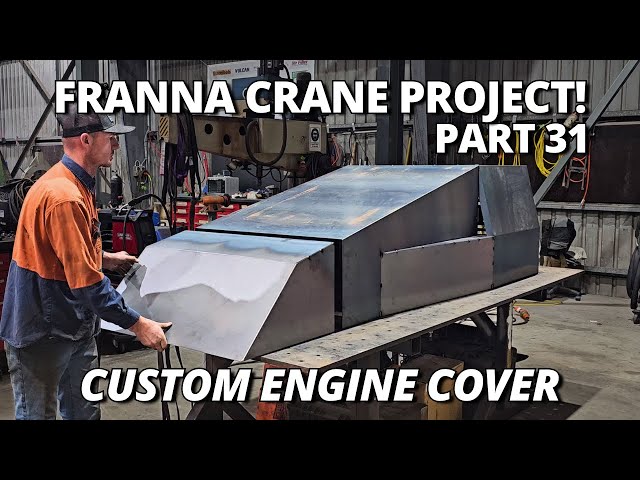
Learn advanced fabrication techniques in this 35-minute workshop video documenting the construction of a custom engine cover for a Franna crane restoration project. Follow along as skilled fabricators piece together pressed sheet metal components and carefully tack them in place, demonstrating professional metalworking methods used in heavy machinery repair. Discover problem-solving approaches when encountering fit issues, specifically addressing transmission access panel alignment challenges that require creative solutions. Master welding techniques for rear frame completion, observe proper sealing methods for new top sheets, and understand the finishing processes for storage compartment welding. Gain insights into the methodical approach required for custom fabrication work where precision and patience are essential for achieving professional results in heavy equipment restoration.

LinkedIn Learning
Take your sheet metal skills to the next level by designing a sheet metal enclosure with SOLIDWORKS in this project-based course.

YouTube
Dive into a comprehensive video guide on CNC plasma cutting technology, operation, and computer-aided manufacturing (CAM). Learn about plasma generation principles, power supply mechanics, torch design, and consumable components. Master the art of optimizing cut speed and quality by interpreting lag lines and adjusting speed, height, and amperage. Explore material handling techniques, including how to build a vacuum lifter for efficient sheet metal manipulation. Gain insights into CNC table design, cutting aluminum, CAM toolpaths, and nesting strategies. Discover practical applications through projects like signage creation and fire pit fabrication. Perfect for both beginners and experienced fabricators looking to enhance their plasma cutting skills and efficiency.

YouTube
Learn to manually create bent HVAC-type parts in Fusion 360 Sheet Metal through this 47-minute livestream tutorial. Discover techniques for transitioning from rectangular to round openings, breaking rectangles, creating polygons, lofting, stitching, thickening, and creating rips. Master the process of converting designs to sheet metal and adding flanges. Gain insights into 3D printing applications for HVAC parts and explore additional resources for further learning.

Pluralsight
Have you ever had to design an enclosure out of sheet metal, but you needed it to fit around a part you already built? If so, SOLIDWORKS: Sketch Driven Sheet Metal Assembly Design is the perfect course for you. The course will cover the creation of a portion of an electrical enclosure to house equipment for assembly line processing machines; in it, you will design and manipulate the enclosure to fit your original part. First, you'll learn how to insert the existing part. Next, you'll establish in-context relations on the existing part. Finally, you'll cover interference detection and how it affects your design process. When you're finished with this SOLIDWORKS course, you'll not only know the tools associated with this SOLIDWORKS project, but you'll also have the ability to solve these kinds of problems down the road. Software required: SOLIDWORKS.

YouTube
Learn to design a shaft holder using sheet metal techniques in Creo Parametric. Explore the process of creating this essential component through a step-by-step tutorial that demonstrates advanced sheet metal design principles and practices. Gain valuable insights into utilizing Creo Parametric's powerful tools for efficient and precise sheet metal modeling, enhancing your skills in mechanical design and engineering.